
|
|
Learn Mirc:
A) How To Connect Mirc:
I made a slide to show the first steps to connect Mirc, follow it.
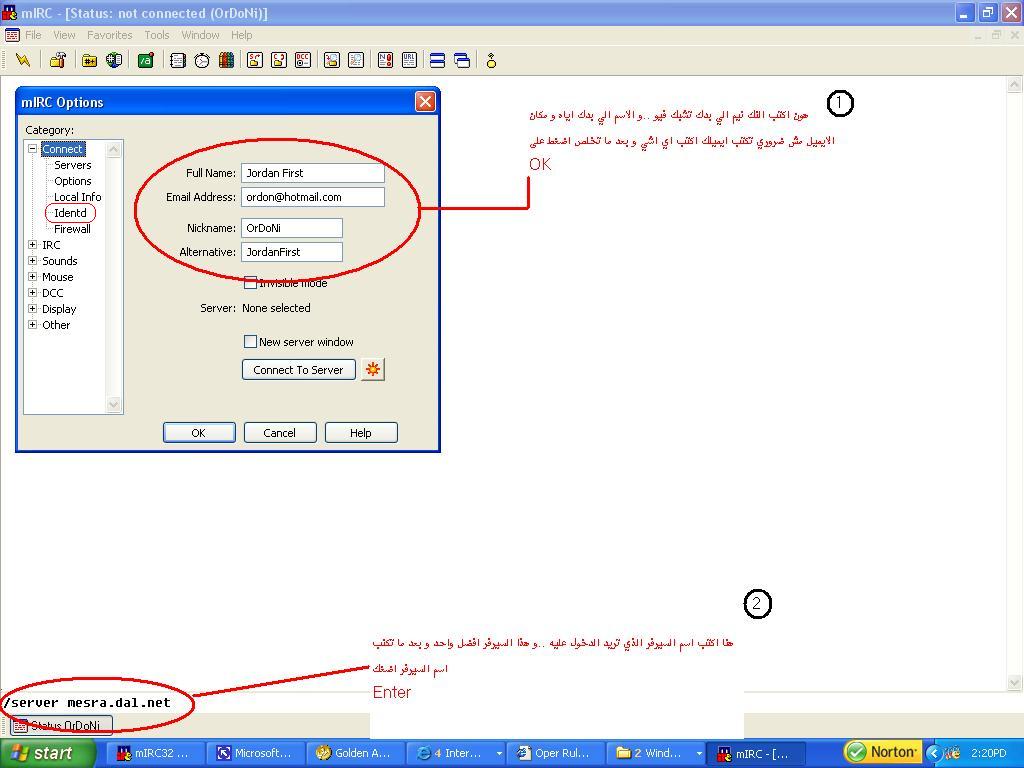
*notes:
1- Servers can you use it to connect Mirc
Arcor.dal.net , Rumble.dal.net , Matrix.dal.net
2- I made circle on this word " Identd " click on it and write your ident in USER ID.
B) How To Register Your Nickname:
1- Join with the nick you want to register it.
2- Type this command on status : /ns register password e-mail
3-You will receive an e-mail on that which you typed when you registered your nick, then follow the instruction shown.
*for help you will find a link like this :/msg NickServ@services.dal.net AUTH "your nick" R5326231358695375
copy it then past on status.
C) How To Identify Your Nickname:
You have 60 seconds to identify your nickname then if u didn't , your nickname will change to guest****
To identify your nick type this on status : /identify password
D) To Join channels type this on status: /join #channel
E) To Change Your Nickname type this on status: /nick nickname
General Commands:
1) Nickserv Commands:
/ns set enforce on : to enforce your nickname so nobody can join with it.
/ns ghost nickname password :to disconnect the nickname if it was stuck.
/ns release nickname password : to release the nickname if it was held by service.
/ns set noop on /off : to set No Op on or off .
/ns set nomemo on/off :if you want to receive memos or no.
/ns set passwd oldpass newpass : to change your password.
2) Chanserv Commands:
/cs aop #channel del/add nickname : to add or remove Aop .
/cs sop #channel del/add nickname : to add or remove Sop.
/cs akick #channel del/add nickname : to add or remove user from akick list.
/cs aop/sop/akick #channel list : to view Sop or Aop or Akick list.
/cs op #channel nickname : to Op by chanserv.
/cs deop #channel nickname : to deop by chanserv.
NOTE: there are more commands for both nickserv and chanserv but those the most important commands you need, but if you want any help ask any OP in channel #JordanFirst